> For the complete documentation index, see [llms.txt](https://help.thealater.org/llms.txt). Markdown versions of documentation pages are available by appending `.md` to page URLs; this page is available as [Markdown](https://help.thealater.org/claiming-land.md).
# Claiming Land
On the server, there is a claiming system in which you are able to prevent griefers and others from getting access to your build.
## How can I get claim blocks?
Everyone starts with 1**00 claim blocks** upon first joining. You earn **100 claim blocks per hour** that you play until you reach 10,000.
Some other ways to earn claim blocks are:
* events
* /daily
* voting
* purchasing ranks
* purchasing claim blocks
## Steps to Claim Land
{% stepper %}
{% step %}
### Type /kit claim
This will give you a golden shovel and stick. The golden shovel is used to make your claim, and the stick can be used to show you what your claim is and what others have claimed!
{% endstep %}
{% step %}
### Right Click Opposite Corners
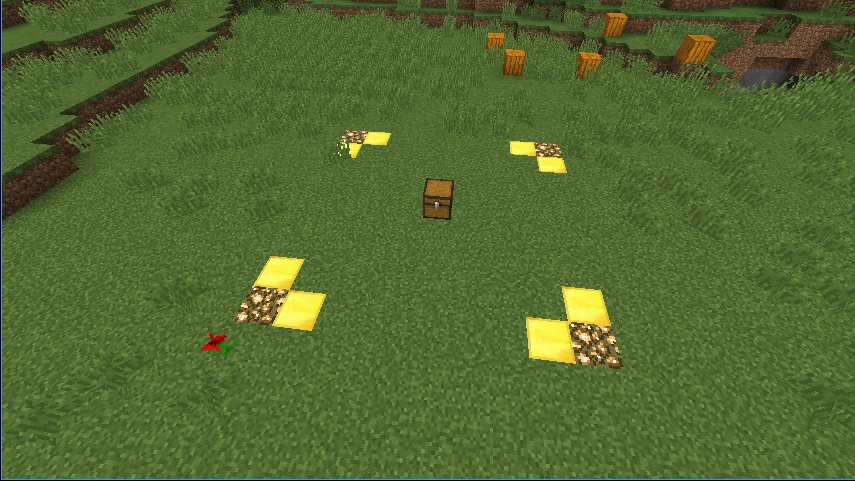
Next, right-click one corner of the square you want to claim. Then, go to the opposite corner and right-click the other side of the square. Glowstone and gold will appear, indicating you have made a claim!
{% endstep %}
{% step %}
### Set a home
Make sure to set a home at your claim! This way you can go back to it super quickly. To do so, do `/sethome` at your base and you can do `/home` to get back there whenever you want
{% endstep %}
{% endstepper %}
## Claim Commands
`/trust (user)` allows players that you trust to have full access to your claim. This means access to touching your build, opening containers and interacting with mobs.
`/containertrust (user)` allows players to open chests and take items from chests, however they cannot build or break blocks on your claim.
`/accesstrust (user)` this allows players to access levers and buttons. This does not give them permission to build or break blocks, or open chests.
`/permissiontrust (user)` this gives all permissions to that player over your plot. They will have the ability to trust players you may not know, delete your whole claim, build/remove blocks, open all chests, and have access to buttons and mobs. DO NOT use this if you do not know the person you are trusting.
`/untrust (user)` removes a player from your trust list.
`/trustlist` shows you all players that are trusted to your plot.
`/claimslist` shows you the coordinates to all of your claims.
### Video Assistance
Still need help? Not a problem. Here is a video we use that may be useful in following along to:
{% embed url="" %}
## Homes
Everyone has the ability to set a home on the server to easily go back to your base.
`/sethome (name)` - sets your home
`/home (name)` - teleports you back to your home
`/delhome (name)` - deletes your home
Depending on your rank, you can set more than one home.